Short answer: if price is what matters, stay with ScreenZen — it is free, and nothing on this page beats free. Switch if you want a different kind of block: a hard block you start with one tap and can't end early — Circuit or Opal — or the pause done a different way, with one sec.
What ScreenZen gets right
ScreenZen (4.9 stars from about 51,000 US ratings) is completely free, supported by optional tips of $5 to $40. When you open an app you picked, it makes you wait a moment first, and the wait grows the more often you come back. On top of that: a daily cap on opens, time limits by day and hour, schedules, website blocking, and a lock mode that its site says prevents uninstalling and makes limits much harder to bypass. It runs on iPhone, Mac, Windows and Android.
That is a lot for nothing, and it is why ScreenZen tops most free lists. The reasons people look past it are about the shape of the block, not the price.
Why people look for an alternative
- The pause is a question, and some nights the answer is yes. A wait before opening works on reflexes. It is less good at "no Instagram until 6pm, whatever I say at 3pm".
- Starting a block should be one tap. If you want to block everything for the next 90 minutes right now — from Control Center, a widget or Siri, without opening an app — a hard blocker is built for that.
- Lots of settings. ScreenZen's configurability is a strength, and also a lot to tune. Some people want fewer decisions.
ScreenZen and the alternatives
| ScreenZen | Circuit | Opal | one sec | |
|---|---|---|---|---|
| Idea | Pause, open caps, limits, lock | Block on schedule or one tap | Block with rules and sessions | Pause before opening |
| Firmest setting | Lock mode: harder to uninstall or bypass | Strict Mode (Pro): no early exit | Deep Focus: can't be cancelled | Re-intervention: sends you out after a set time |
| Yearly (US) | Free (optional tips) | $59.99 | $99.99 | $19.99 |
| Free version | Everything | One schedule, blocks up to 30 min | One rule, basic timers | One app |
| Other platforms | Mac, Windows, Android | iPad | Android, Mac (per site) | Mac, Android, browsers |
Circuit — a hard block, one tap away
Circuit is ours, so weigh this accordingly. Where ScreenZen asks before every open, Circuit decides once and holds:
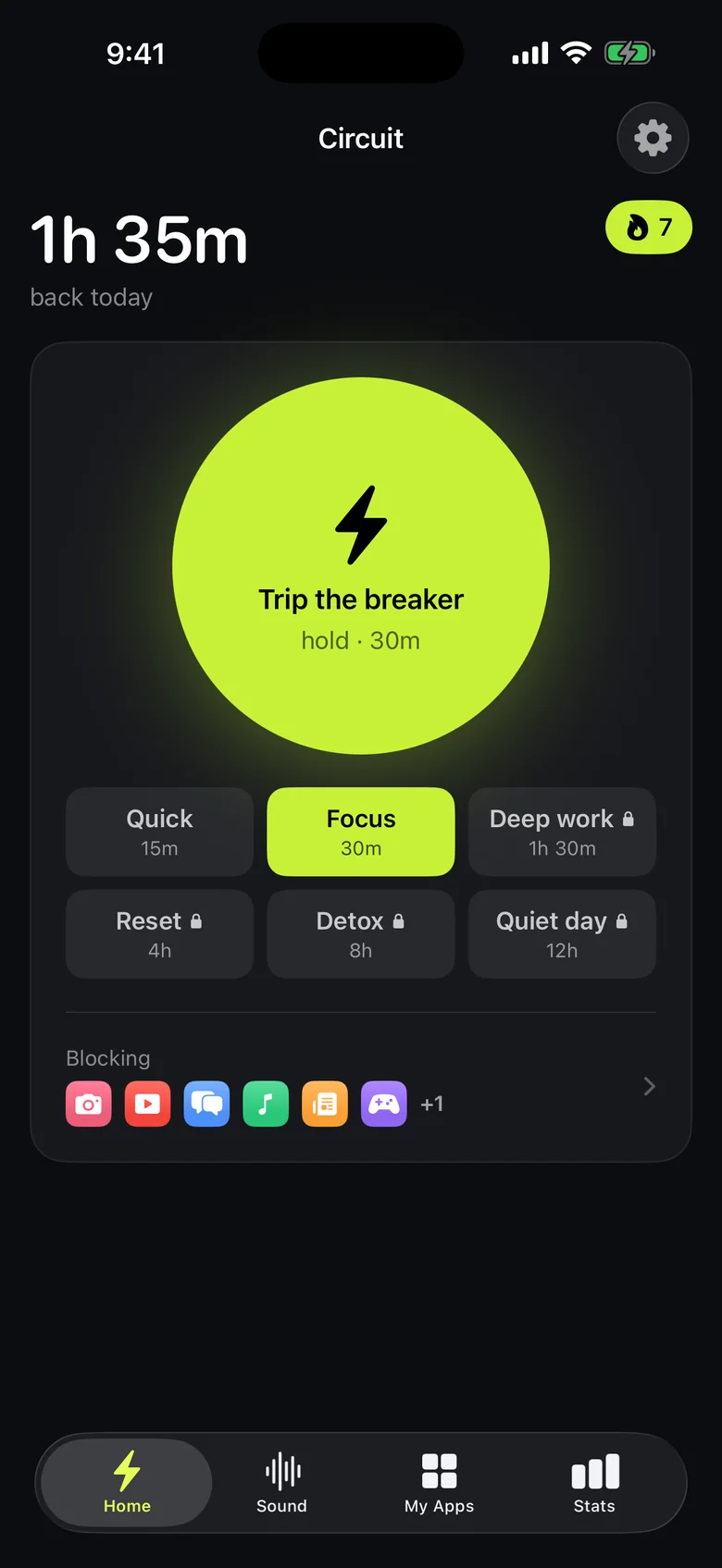
- The Breaker. Hold one button and your chosen apps, app categories and websites are blocked for 15, 30, 60 or 90 minutes, or a whole day. It is also a Control Center control, a widget and a Siri shortcut, and a Live Activity keeps the countdown on your Lock Screen.
- Schedules that start and stop by themselves — "Study, weekdays 18:00–21:00", "Sleep, 22:30–07:00".
- Strict Mode (Pro), where the block runs to the end. Without it, ending a block early asks for a breath, a wait or a typed sentence — ScreenZen's kind of friction, placed at the exit instead of the entrance.
- Daily limits (Pro) for the app you want to keep but ration — thirty minutes of Instagram a day.
Where ScreenZen is ahead: it is free, it caps the number of opens per day, and it runs on Windows and Android as well. Circuit is iPhone and iPad only, and its free version is one schedule and blocks up to 30 minutes.
The others
Opal (4.7, about 89,000 ratings) is a hard blocker like Circuit, with Deep Focus sessions that can't be cancelled. It costs $99.99 a year or $19.99 a month. How Opal compares.
one sec (4.8, about 24,000 ratings) is the other pause-first app. It is free for one app and $19.99 a year beyond that. If you like ScreenZen's idea but want a different take on it, try it on your worst app. one sec and its alternatives.
Which to choose
- You want the most for free → stay with ScreenZen.
- You want set hours with no negotiation → a hard blocker with a strict mode: Circuit or Opal.
- You want a block in one tap from anywhere → Circuit's Breaker, from Control Center, a widget or Siri.
- You use Windows or Android too → ScreenZen covers both; Circuit does not.
For the full field, see the best app blockers for iPhone in 2026, or what each free tier actually gives you.
Try Circuit free — one schedule and blocks up to 30 minutes cost nothing, and Pro starts with a 7-day trial.
Questions people ask
Is ScreenZen really free?
Yes. ScreenZen's site says it is completely free and supported by donations. Its only in-app purchases on the US App Store are optional tips from $5 to $40.
What does ScreenZen do?
It puts a pause before a distracting app opens, with the wait growing on repeated opens, and adds daily open limits, time limits, schedules, website blocking and a lock mode that makes it harder to uninstall or bypass. It runs on iPhone, Mac, Windows and Android.
Why would I use something other than ScreenZen?
Mostly for a different kind of block. ScreenZen is built around the pause before opening. If you want to start a fixed block in one tap — from Control Center, a widget or Siri — with a countdown on your Lock Screen and no early exit, a hard blocker like Circuit or Opal is closer to that.
What is the difference between ScreenZen and one sec?
Both pause you before an app opens. ScreenZen is free for everything; one sec is free for one app and costs $19.99 a year or $6.99 a month on the US App Store for more.
Ready to trip the breaker?
Free includes one schedule and the Breaker up to 30 minutes.